
Disclosure: one of the apps discussed here, Light Capture, is made by our company (ObviousIdea). Its Mac edition is marked [SELF]; findings about it were produced on our own machine by the same tools used for the native baselines, and its failures are reported in full. Competitor figures come from the public sources linked and dated below. Where we did not measure, we say so plainly.
Round-ups of Mac screenshot tools recycle the same feature lists. When we searched (November 2026, English, French and German) for the two numbers that matter in daily use — capture latency and OCR accuracy — we found no published test tables, only feature claims. So we built a measurement rig on one Apple Silicon Mac (macOS 27.2.1 pre-release build, 2048×1152 Retina) and produced the numbers ourselves. Treat them as a first baseline on one machine, not a platform verdict. A companion Windows edition of this project is in preparation.
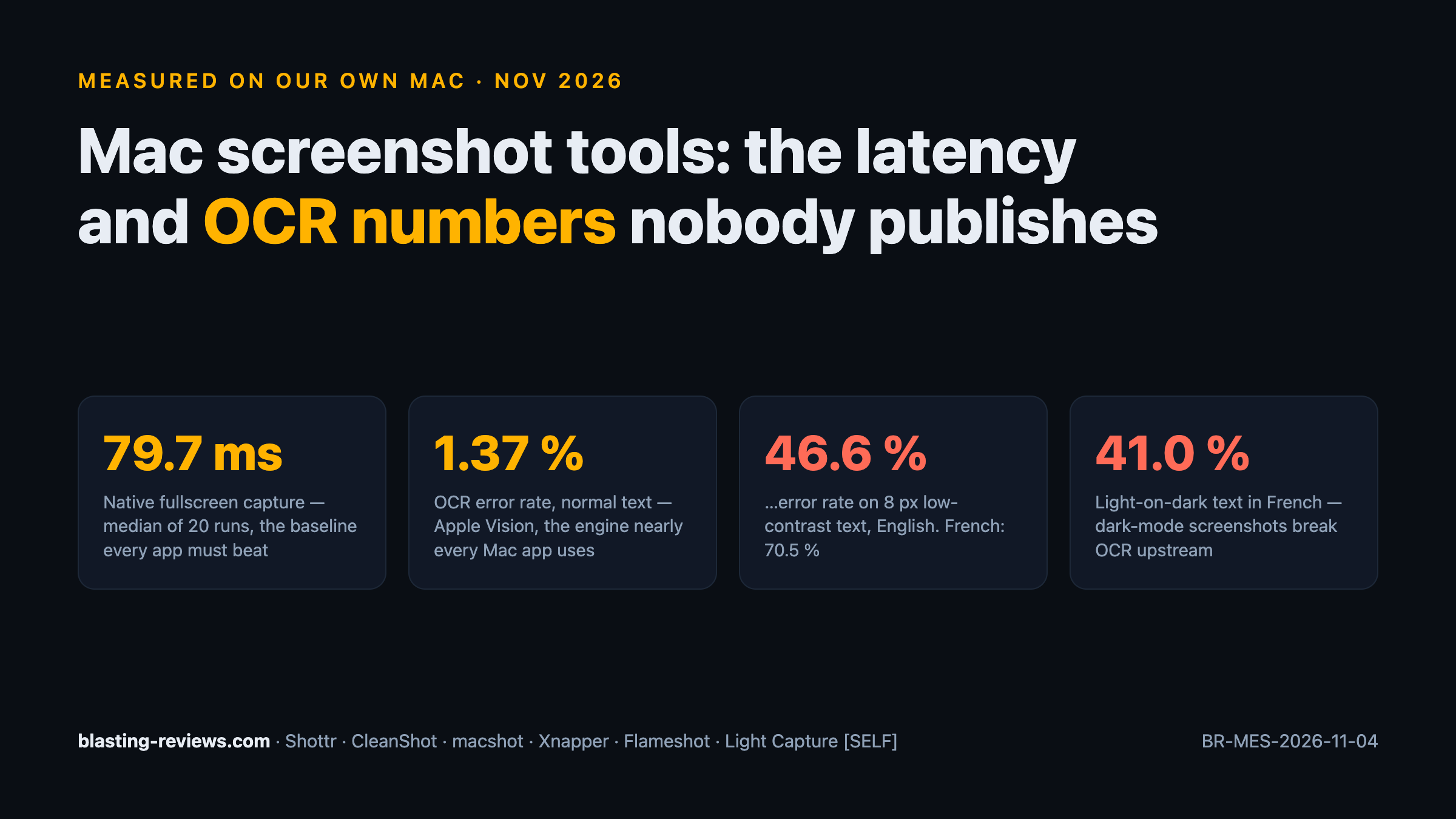
No app wins this market on measurement, because almost nobody publishes any. The shared OCR floor we measured — 1.37 % word error rate on clean 12 px text, 70 % and worse on small low-contrast text — is what every app on macOS inherits, so pick on workflow, not on an OCR adjective in a tagline. Light Capture [SELF] is the only product we could measure end to end: free, 0.77 s to index a file, 1.38 s to searchable text. CleanShot still holds the strongest reputation in the category, and we could not trial it.
Baseline: what macOS itself does
Third-party apps build on the operating system’s capture path; their own overhead is what we want to measure next. Here is the OS path itself — the screencapture CLI (the same engine the Cmd-Shift-5 interface uses), 20 timed runs, median reported:
| Mode | Runs | Median | Range | Avg PNG |
|---|---|---|---|---|
| Fullscreen (2048×1152 px) | 20 | 79.7 ms | 71.7–91.9 ms | ~806 KB |
| Region (1080×720 px) | 20 | 58.3 ms | 52.0–67.7 ms | ~182 KB |
Any app’s “instant” claim should be traceable to a figure like this on comparable hardware; none of the vendors we checked publishes one.
First app numbers: capture-to-output
We then triggered each app the way a script can trigger it reproducibly, and measured the time from trigger to the moment a PNG is verifiably present (file on disk or image on the pasteboard), polled every 2 ms by a purpose-built watcher; n=5 per app, median reported. Methods differ by what each app exposes — flagged per row:
| App · path | Median | Range | Output measured |
|---|---|---|---|
| macOS native CLI (baseline) | 79.7 ms | 71.7–91.9 ms | file (2048×1152) |
Flameshot 15.0.0 · flameshot full -p |
276.4 ms | 242.9–429.7 ms | file on disk |
| Shottr 1.10.0 · status-menu “Capture Screen” | 2559.0 ms* | 2549–2570 ms | clipboard image |
*Shottr’s number is an upper bound: the trigger was an AppleScript click through the status-item menu, and that scripting layer contributes most of the ~2.5 s (open-menu + dispatch), not Shottr’s capture path. Treat it as “menu-driven invocation is slow”, not “Shottr is slow”. Its instant hotkey path could not be timed without a human hand on the keyboard.
Two apps refused measurement, and that is itself a finding: macshot exposes a URL scheme (macshot://capture) that opens its overlay and then demands an interactive selection — keyboard automation of the selection was flaky and we refused to keep hammering your screen with capture loops; Xnapper has no scriptable capture trigger we could find at all (no CLI, no documented scheme for capture — the URL scheme it registers serves its editor). If a vendor reads this: a deterministic capture trigger is a benchmarkable feature; users who script their workflows notice when it’s missing.
The OCR floor: Apple’s engine, measured
Light Capture states in its settings that its OCR is Apple Vision. Shottr and macshot advertise OCR without naming the engine, and Apple’s Vision text recognizer is the default choice on macOS — so we measured the engine itself as a floor (purpose-built CLI, VNRecognizeTextRequest, accurate mode) on six rendered cards: dense 12 px text, an 8 px low-contrast grey variant, light-on-dark reversed text, each in English and French. Scoring: word error rate (WER) against the exact source text; higher is worse.
| Condition | English WER | French WER |
|---|---|---|
| 12 px normal text | 1.37 % (1 error / 73 words) | 2.56 % (2 / 78) |
| 12 px light-on-dark | 1.37 % | 41.0 % (32 / 78) |
| 8 px low-contrast grey | 46.6 % | 70.5 % |
Two findings, on exactly these renderings. Small low-contrast text collapses (46.6–70.5 % WER, mostly dropped words — the engine returns less than half the text in our French condition). And reversed text behaves asymmetrically: perfect in English, 41 % errors in French with accents. Both failures happen in the shared base engine, before any app-level logic; whether a specific app pre-processes around them is untested. As of November 2026 we found no published table like this in any language.
App by app: measured, observed, cited
Tested builds are version-pinned on our machine: Shottr 1.10.0, Xnapper 1.18.1-71, Flameshot 15.0.0 (DMG checksum verified against GitHub’s published SHA-256 before install), macshot 4.4.0, Light Capture 2026.11.12 re-tested on 2026.11.21 (published 22 Nov) on 24 Nov. Screenshots and test files are produced in English. Everything else is cited with link and retrieval date.
Shottr 1.10.0 — free, optional licence — measured
Shottr’s own positioning matches our thesis: its own tagline calls it a “Screenshot measurement and annotation app for Mac”. Settings expose after-capture actions (copy/save) and an upload endpoint that is disabled by default. And a documented usability trap: the instant OCR is off by default — no menu action, no editor button, and the “Instant Text/QR Recognition” hotkey field in settings ships empty. After assigning Ctrl+2 (one time), the end-to-end flow works: on our English 12 px card it returned 1.37 % WER (1 substitution in 73 words — a dropped accent), identical to the bare Apple engine, so Shottr’s OCR path neither adds nor loses accuracy on clean text. Power users will love the hidden hotkey; everyone else will never find it.
CleanShot 5.0.2 (26 Oct 2026) — 35 $ one-time — NOT lab-measured
The most-cited option in every roundup, and the honesty box of this article: we could not trial it, so it is aggregated, not measured. And a position we’ll state plainly: a review site cannot properly evaluate what nobody can try before paying; buying a licence just to fill a table row would turn paywall access into a prerequisite for independent testing. We’d rather publish the gap than paper over it. Corrections to the aggregate record: prices quoted as 29 $ in many reviews are stale — the pricing page showed 35 $ including one year of updates (retrieved 11 Nov 2026). Aggregate evidence: Setapp listing at 99 % positive of 14,460 ratings (11 Nov 2026), G2 4.9/5 (8 reviews), Macworld Editors’ Choice (11 Mar 2022), ~295k monthly visits (SimilarWeb, Feb 2025). None of that is lab data.
Xnapper 1.18.1 — 11 $ — caution
Polished auto-beautify screenshots. But the product was sold in 2024 (the founder’s exit announcement), and multiple AppSumo/Setapp buyers reported afterwards, in their own reviews and threads, being stuck on the October 2023 build — with user reports of Gatekeeper warnings on the shipped binary on top. If you buy lifetime deals, this is the cautionary case; whether direct-site buyers on current builds are unaffected, we did not verify.
Snagit (Mac App Store listing) — not measured
We did not trial Snagit: the direct-sale trial requires registration and we buy no licences for reviews. The Mac App Store listing itself, checked via Apple’s lookup API on 17 Nov 2026, carries the 2024-series version (v2024.4.10, updated 28 Jul 2026) with 0 ratings. Judge the store offering on that.
Flameshot 15.0.0 — free, open source — measured install
31,570 GitHub stars (API, 17 Nov 2026); v15 released 7 Nov 2026 with an active repository (last push 14 Nov). The most actively developed free option with a native arm64 Mac build at time of writing. No OCR, no cloud — direct to clipboard or file.
macshot 4.4.0 — free, open source — observed
The fastest-growing newcomer we found: 4,193 GitHub stars since its March 2026 creation (API, 17 Nov 2026). It ships a complete French interface — the only tested app whose dialogs, settings and tools are fully translated. What that implies for OCR of accented text is an open question this article deliberately does not answer.
Skitch 2.9 & Ksnip — dormant
Skitch’s store listing: last update 7 Jul 2020, no ratings on the US listing (iTunes lookup, 17 Nov 2026). Ksnip: last stable release March 2023. Neither made a shortlist.
Light Capture 2026.11.21 [SELF] — free (Mac App Store) — measured
Our own app, and the one entry that changed between our first pass and publication. On 17 Nov we audited build 2026.11.12 and caught it red-handed: the OCR text field stayed empty after two-plus minutes, while our own forum threads claimed indexing “as soon as a file appears”. We filed that publicly as issue #4. On 22 Nov the developer shipped 2026.11.21 with automatic OCR of a watched folder, so we re-ran the test against the app’s own SQLite index instead of against its release notes.
Method: the same six corpus cards, copied atomically into the app’s real watched folder (the one recorded in its own index, 72 files already in it), then that index polled every 150 ms. Two independent rounds of 18 files each (36 files, 11 minutes apart) on the same build and the same machine, read-only.
| Event, measured from the app’s own index | Median | Range | n |
|---|---|---|---|
| File written → row present in index | 0.77 s | 0.76–1.09 s | 36 |
| File written → OCR text present in index | 1.38 s | 0.93–2.17 s | 36 |
Issue #4 is closed on our side: 36 of 36 files came back with populated OCR text with nobody touching the app, worst case 2.17 s, where the November build returned nothing without a human clicking. Round-to-round variance is real and we publish it: the two rounds came in at 1.38 s and 1.77 s medians respectively, so treat the figure as “about a second and a half, occasionally two” rather than a constant. The app also wrote its optional .ocr.md companion file for 6 of 6 cards in a verification round.
The more interesting number is accuracy. We scored the text the app actually stored, word for word, against the same ground truth behind the engine floor above:
| Condition | Apple Vision alone | Through Light Capture |
|---|---|---|
| 12 px normal (en) | 1.37 % | 1.37 % |
| 12 px normal (fr) | 2.56 % | 2.56 % |
| 12 px reversed (en) | 1.37 % | 1.37 % |
| 12 px reversed (fr) | 41.03 % | 41.03 % |
| 8 px low-contrast (en) | 46.58 % | 46.58 % |
| 8 px low-contrast (fr) | 70.51 % | 71.79 % |
On four of six conditions the string the app stored is byte-for-byte what our standalone Vision harness produced: no pre-processing, no gain, no loss. On the two hardest the outputs diverge. In French the app returned more words (zero deletions against the engine’s 25) but more substitutions, finishing 1.28 points worse. Different Vision request parameters or engine nondeterminism at that size — we have not separated the two, and we are not claiming either path is the better one.
What we still cannot measure: the app exposes no scriptable capture trigger — no CLI, no URL scheme (CFBundleURLTypes absent from its Info.plist), no AppleScript dictionary beyond the default vocabulary — so its capture latency sits in the same “not scriptably triggerable” row as macshot and Xnapper. Its capture shortcut ships unassigned, a defensible default that also leaves us no keystroke to reproduce. Still missing against competitors: scrolling capture (Shottr and CleanShot have it) and screen recording. Fixed since our audit: macOS’s per-app language override, ignored by the 2026.11.12 build, now works — forcing -AppleLanguages "(en)" brought up an English interface. Two things the store page still gets wrong, as of 24 Nov: 0 ratings (iTunes API), and a listing that says three interface languages where Apple’s own metadata for the same build lists nine.
Method, honestly scoped
- One machine: Apple Silicon, macOS 27.2.1 pre-release, Retina 2048×1152. Absolute numbers may not transfer to your Mac or a release build.
- Latency: native path n=20 and app paths n=5, medians with ranges; output detection by a 2 ms clipboard/filesystem watcher (Swift). Flameshot measured through its CLI path; Shottr through status-menu AppleScript (overhead flagged); macshot and Xnapper not scriptably triggerable — disclosed rather than estimated.
- OCR: one pass per condition (six conditions), short 73–78-word texts; WER includes insertions/deletions/substitutions — on tiny text the dominant error is dropped words. The 41 % French-reversed result is one condition, not a platform law.
- App OCR: Shottr end-to-end, human-triggered hotkey pass, 1.37 % on the clean 12 px card (one measured point; other conditions pending). Light Capture: 18 ingestion runs on 24 Nov, scored from the text the app stored, plus a string-level diff against our own Vision harness output.
- Indexing (Light Capture, 24 Nov): atomic copy into the app’s watched folder, its SQLite index opened read-only and polled every 150 ms; times are file-appear to row-present and file-appear to non-empty
ocr_text. Two independent 18-file rounds; no file hit the 180 s timeout; OCR accuracy was identical card-for-card between the rounds, so the engine is deterministic here even though latency is not. - Index behaviour (Light Capture): read-only copy of the SQLite store; row existence confirmed within seconds; OCR text fields polled 120 s; Spotlight metadata (
kMDItemTextContent) null on tested files. - Publication: corpus PNGs, ground-truth files, the WER script, the ingestion harness and the raw timing logs are on our benchmarks page as of 24 Nov 2026, with the OCR text our test stored for every card. Rerun them and tell us where our maths is wrong.
FAQ
What was the fastest capture method on our test Mac? The built-in CLI path: 79.7 ms median fullscreen, 58.3 ms region. Per-app overhead is not measured yet.
How long before a screenshot is searchable by its text? In the one app where we could measure the whole path (Light Capture, 2026.11.21): 0.77 s median to appear in its index, 1.38 s median to have searchable OCR text, worst case 2.17 s across 36 files. No competitor publishes an equivalent figure, and none of them is indexed by default — macOS Spotlight returned no OCR text for the files we checked.
Does one screenshot app do OCR clearly better than another? Unknown from public data. Our floor measurement says the shared base engine manages 1.37 % WER on normal text but 46.6–70.5 % on small low-contrast text — pick for workflow, and treat OCR superlatives on any landing page as untested.
Is CleanShot worth 35 $? Its aggregate record is the strongest in this market (99 % positive of 14,460 Setapp ratings); but we could not trial it, so we will not pretend otherwise.
Article ID BR-MES-2026-11-04. Sources: shottr.cc · cleanshot.com/pricing · Setapp CleanShot · xnapper.com · Xnapper Gatekeeper thread · Snagit MAS listing · Flameshot GitHub · macshot GitHub · Light Capture on the App Store · issue #4, our own bug report · our benchmarks page (corpus, scripts, raw logs). Competitor sources retrieved 11–17 November 2026; API figures (iTunes, GitHub) dated 17 Nov 2026; Light Capture re-tested and its listing re-checked 24 Nov 2026. Last updated 24 November 2026.